n8n AI Agents in Production: What We Put Around the Model
What an n8n AI agent needs before real users touch it: output checks, validation, reconciliation, evaluations and approvals, from our own builds.

On this page
- What does an n8n AI agent look like in production?
- Where do agents break first?
- What do you put around the model?
- How do you test an agent before go-live?
- When should a person decide?
- Where do memory, RAG and MCP fit?
- What does an agent need from your IT team?
- What should your first production agent be?
- How do you know an agent still works after go-live?
- Short questions
- Where to start
The AI model in a client's accounts payable pipeline reads each vendor invoice and returns the fields as JSON, and one of the first bugs we fixed was the model wrapping that JSON in markdown code fences, which broke every step after it. The model was right about the invoice. The process around it wasn't ready for the model.
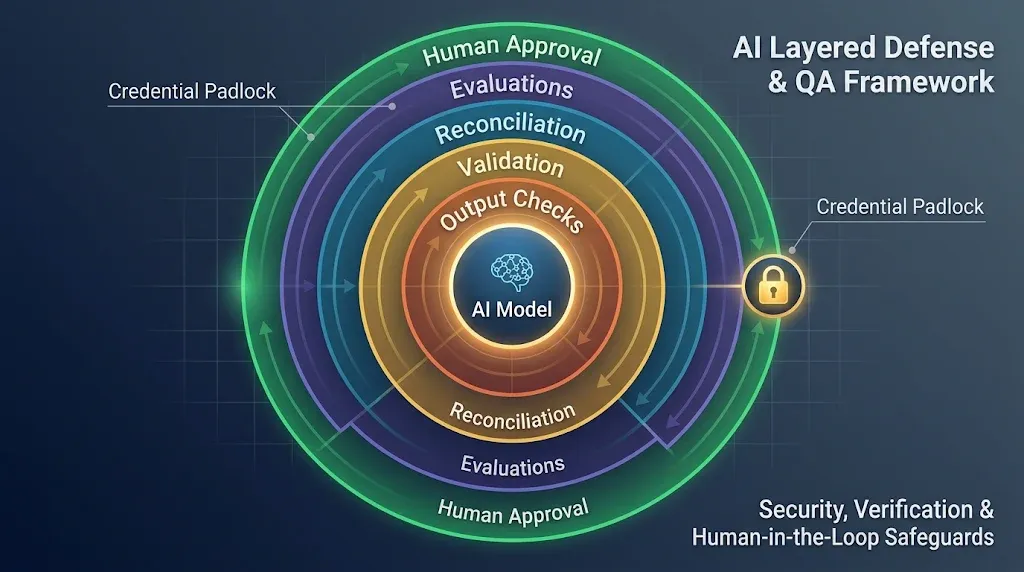
An AI agent in production is a process with an AI node inside it: you govern the risk on the credentials and on the process, more than on the prompt. In n8n, that means five things around the model: output checks, validation against your own data, reconciliation for what the agent missed, evaluations before go-live, and a person who decides before anything reaches a customer or a ledger.
This is the guide for the whole topic. The other articles in this series go deeper on each part.
What does an n8n AI agent look like in production?
Less like a chatbot than most people expect. In the builds we run, the AI does one of three jobs:
Job | What the AI does | Example from our work |
|---|---|---|
Extract | Reads a document and returns structured fields | Vendor invoices arrive by email, are stored, read by a model, cleaned, checked and written to the accounting system as bills |
Converse | Talks with a person and collects or produces something | A content assistant that works through ideas with the client's team before it writes any campaign post, using the client's own articles as its knowledge base |
Answer the phone | Handles a call when no one is available | An after-hours voice agent collects the caller's name, contact details, preferred time and reason, and hands them to an n8n workflow |
In each case, the model is one node. The rest is ordinary n8n: a trigger, data from your systems, code that cleans and checks, writes to a database, and an alert when something doesn't add up. In n8n, the AI Agent node holds the model, its memory and its tools as sub-nodes, and the workflow around it decides what happens to what it returns.
For the content assistant, that meant a model (GPT-4.1-mini), conversation memory in Postgres, a vector store in Pinecone with the client's knowledge articles, and Airtable as the place where campaign posts live. Four components, and only one of them is the model.
Where do agents break first?
Rarely where the demo did. In our builds, the first failures were all at the edges of the model:
Output format. A model asked for JSON sometimes returns JSON inside markdown fences, or with a sentence before it. Every downstream node fails on input that looks right to a human.
Tool behavior. On the content assistant, the Airtable tool's filter formula didn't return reliable results when the agent built it. The fix was to remove the filter and let the agent reason over the full result set, a trade of more tokens for fewer wrong answers.
Data that's almost right. An extracted amount with the wrong decimal separator, a vendor name spelled the way the invoice spells it instead of the way the accounting system does. The model did its job; the data still doesn't match.
Nesting you didn't expect. On the accounts payable build, the ID returned by the accounting API sat one level deeper than its documentation suggested, and attachments were saved with an empty reference until we caught it.
None of these is a prompt problem. A better prompt reduces them, and the checks in the next section are what catch them.
What do you put around the model?
Checks that don't depend on the model being right. On the accounts payable pipeline, the chain looks like this:
A sanitizer after the model. A Code node strips fences and stray text, parses the JSON, and normalizes amounts and dates before anything else touches the data.
Validation against your own data. After the invoice is written to Postgres, SQL checks confirm the record makes sense against what the business already knows: a known vendor, a valid account, totals that add up.
Reconciliation for what the agent never saw. A separate workflow compares the invoices that arrived by email with the ones that were processed, so a message the pipeline missed shows up as an exception, not as a late payment.
Credentials scoped to the job. The workflow that reads invoices can't do anything else in the accounting system that the job doesn't need.
You may be thinking this is a lot of plumbing for one AI node. It is, because the model is the part you can't fully control, and everything around it is built to catch what it gets wrong.
How do you test an agent before go-live?
With a fixed set of real cases and a score you can compare across versions. n8n has an Evaluations feature for running a workflow against a test dataset and recording the results (n8n docs, evaluations).
On the accounts payable build, we set it up with results stored in our own Postgres table, keyed by execution and run, so every change to the prompt or the model gets compared against the same invoices. The question it answers is simple: did this change make the agent better on the cases we care about, or only on the one we were looking at?
When should a person decide?
Before anything reaches a customer, a ledger or a public channel.
Sometimes that's an approval step: the agent prepares, a person approves, the workflow acts. n8n supports waiting for a human response inside a workflow (n8n docs, human in the loop).
Sometimes it's built into the conversation. The content assistant's system prompt requires rounds of ideas with the client's team before it writes any campaign post. The team decides direction; the agent does the drafting.
An approval has a limit, and builders on r/n8n name it: "The approval gates the visible action, not the access", because "credentials in n8n aren't scoped to a node" (r/n8n thread). In practice: a person can approve every email the agent sends, and the agent's credential can still read every mailbox it was given. Scope the credential first; the approval comes second.
Where do memory, RAG and MCP fit?
They're the agent's context and its reach, and each one is a decision about access.
Memory keeps the conversation. In production, store it somewhere you back up and can clear, such as Postgres, not in the instance's memory.
RAG gives the agent your documents. What goes into the vector store, and who can see the answers, decides more than the model does (n8n docs, RAG in n8n).
MCP lets the agent use tools from other systems, or lets outside assistants call your workflows (n8n docs, MCP Server Trigger).
We've also been running n8n's newer native Agents feature on a self-hosted instance for a few weeks, and it's been stable so far. The principle doesn't change with the feature: the agent is still one part of a process you design.
What does an agent need from your IT team?
Four decisions that belong to IT, not to the person building the workflow:
Where the data goes. Every call to a hosted model sends the prompt, and whatever data is in it, to the model provider. Check the provider's terms on retention and training for the plan you use, and decide which data may be sent at all.
Which keys the agent uses. One model provider key per environment, so development traffic can't spend production budget or touch production limits, and a key can be revoked without stopping everything else.
What each tool can reach. Every tool connected to the agent runs with a credential. That credential is the real limit on what the agent can do, whatever the prompt says.
How long the evidence stays. Executions hold the inputs and outputs of every run. Decide how long to keep them: long enough to investigate a wrong answer, short enough that personal data doesn't sit there for years.
Those four answers turn an AI experiment into something an IT team can approve.
What should your first production agent be?
Smaller than the one you have in mind. A first agent goes well when four things are true:
It does one job. Extract the fields from one kind of document, or answer one kind of question. Not "help the finance team".
Its users are inside the company. A colleague who gets a wrong answer can report it to the builder; a customer usually doesn't.
Its output can be undone. A draft, a record waiting for approval, a suggested reply. Nothing that sends, pays or deletes on its own.
You can measure it. If you can't say what a correct result looks like for twenty real cases, you can't evaluate it, and you won't know whether the next change made it better.
The accounts payable pipeline fits all four: one job, an internal team, records that a person reviews, and invoices whose correct values are known. Agents that talk to customers come later, once the checks around the first one have earned the team's trust. A small first agent shows you what your checks miss while a miss is still cheap.
How do you know an agent still works after go-live?
By watching the process, not the model. An agent that passed its evaluations in October can drift in November without anyone changing it: a vendor changes its invoice layout, a model provider updates the model behind the same name, a tool starts returning a new field.
What we watch:
Exceptions from the checks. If the validation and reconciliation steps start flagging more records than usual, something upstream changed. That number is the agent's health indicator.
Failed executions. An error workflow that alerts a person when a run fails (n8n docs, error handling), so failures don't wait for someone to open the executions list.
The evaluation set, again. Rerun it when you change the prompt or the model, and when the provider announces a model update.
Cost per run. Tokens per execution, tracked over time. A jump usually means the agent is looping on a tool or reading far more context than it needs.
None of this needs a new platform. It's the same discipline as any production workflow, applied to the one node that can surprise you.
Short questions
Which model should an n8n agent use? The cheapest one that passes your evaluations. We've shipped with GPT-4o for extraction and GPT-4.1-mini for a conversational assistant; the right choice depends on the job, and an evaluation set is what lets you switch with confidence.
Can users chat with an n8n agent outside n8n? Yes. n8n has a built-in chat trigger, and agents can sit behind other chat interfaces; internally, we run our own UI connected to our n8n agents.
Where should the agent's prompt live? Somewhere it has a history. A system prompt edited inside the node changes production the moment someone saves it. Keep it versioned with the workflow, change it through the same review as any other change, and rerun the evaluation set before it goes live.
Should the agent write to the accounting system directly? Only after many tests and evaluation runs, and even then with guardrails around the write: the sanitizer and validation checks before it, a credential scoped to the job, and reconciliation after it.
Is an AI agent the same as an automated workflow? No. A workflow follows the steps you wrote; an agent chooses some of its steps. In production, the useful question is which decisions you're comfortable letting it choose.
Where to start
Pick one process where the AI does one job, and build the checks around it before you widen its reach: output, validation, reconciliation, evaluation, approval. If you're putting an agent in front of real users, our Implementation service builds it with your team, not around it, and you own everything we build.
Symplytics is an official n8n Expert Partner based in Toronto. If you have an agent that's ready to leave the demo, walk us through it on a free intro call.