n8n pricing in 2026: what a company actually pays
n8n prices from free to Enterprise, what each plan turns on for a team, and when a paid license beats the workarounds your engineers keep alive.

On this page
- How much does n8n cost in 2026?
- Is self-hosted n8n free for a company?
- What does the license turn on for a team?
- What do you pay for when you stay on the free plan?
- When are the free and entry plans the right call?
- When is a paid plan worth it?
- Does buying the license give you governance?
- So which plan should you be on?
- Questions people ask about n8n pricing
A junior builder with access to production opens the workflow that syncs your orders, changes one field to test something, and hits save. On a shared n8n instance where everyone can touch everything, nothing stops that save, and nobody finds out until a customer calls.
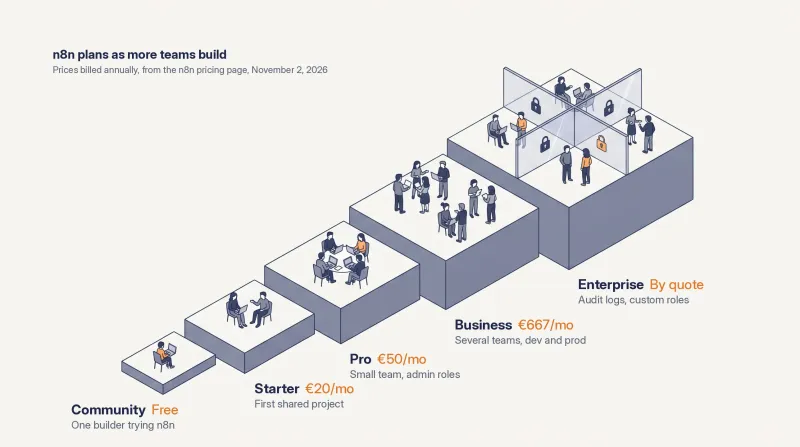
n8n's license costs anywhere from nothing (the self-hosted Community edition) to €667 a month for the self-hosted Business plan billed annually, with Enterprise priced by quote (n8n pricing page, checked on November 2, 2026). For one team with a handful of builders, the free or entry plans are often the right call. Once n8n spreads across several teams, the bigger cost is the engineers who keep the workarounds alive: shared logins, credentials tied to whoever created them, workflows copied by hand between "test" and "prod". The paid plans turn on the features that replace those workarounds, and someone still has to configure them properly.
At Symplytics (an official n8n Expert Partner based in Toronto) we run n8n projects for companies of very different sizes. Some of them should stay on the free edition. Some of them were paying for the workarounds long before they paid for a license.
How much does n8n cost in 2026?
Five options, from free to a custom contract. n8n charges by workflow executions per month (one execution is one full run of a workflow, however many steps it has), and every plan includes unlimited users.
Plan | Price, billed annually | Where it runs | Executions per month |
|---|---|---|---|
Community edition | No license fee | Your own servers | Not sold by execution |
Starter | €20/month | n8n Cloud | 2,500 |
Pro | €50/month | n8n Cloud | 10,000 |
Business | €667/month | Self-hosted only | 40,000 |
Enterprise | By quote, through us or n8n's sales team | n8n Cloud or self-hosted | Custom |
Source: n8n pricing page, checked on November 2, 2026. n8n publishes its prices in euros, including for visitors in Canada. If you need the figures in US dollars, ask us and we'll show you. Monthly billing costs about 20% more than the annual prices above. n8n also offers a Startup plan at 50% off Business for companies under 20 employees.
Two things on that table matter more than the prices. First, users are free: your tenth builder costs nothing on the invoice. What moves the invoice is how often your workflows run and which features you need. Second, the jump from Pro to Business is large, and it's where most of the features for working as a team begin (the pricing page describes Business as the plan for companies under 100 employees that need collaboration and scale).
Is self-hosted n8n free for a company?
The software is. The team features aren't, and neither are the servers or the people who run them.
n8n's documentation lists what the free Community edition leaves out: projects, SSO (SAML and LDAP), environments, version control with Git, external secrets, log streaming, and sharing of workflows and credentials. On sharing, the page is specific: only the instance owner and the person who created a workflow or credential can access it (n8n docs: Community edition features, checked on November 2, 2026).
In practice: on the free edition, every workflow and every credential belongs to one person. When that person is on holiday, someone logs in as them or as the owner. When they leave, their workflows go with their account.
A user on n8n's own forum put it plainly: "Self-hosting is free only while you stay on the Community edition" (n8n community forum, July 12, 2026). Then add the server, the database, backups and upgrades, which are yours to run on any self-hosted plan.
What the license itself allows you to do commercially is a separate question, and it gets its own article, to come soon.
What does the license turn on for a team?
The features that decide who can see, change and publish what. Read the table from the left: each row is a problem teams hit once several people build, and the right-hand columns say which feature answers it and the first plan the pricing page lists it on.
What the team runs into | Feature that answers it | First plan that lists it |
|---|---|---|
Every builder can open every workflow | Shared projects with project roles | Starter (1 project); Pro (3 projects, editor role); Business (6); Enterprise (unlimited, plus custom roles) |
People log in with a shared admin account, and leavers keep access | SSO and LDAP | Business |
Changes are made straight in production | Multiple environments (dev and prod) | Business |
Nobody can say who changed a workflow, or roll it back cleanly | Version control using Git | Business |
API keys live inside n8n and get rotated by hand | External secret store integration | Enterprise |
The security team wants n8n's activity in their own tools | Audit logging, log streaming | Enterprise |
Sources: n8n pricing page and n8n docs: Community edition features, both checked on November 2, 2026. Feature lists change between releases, so check them on the day you decide.
If a row on the left sounds familiar and the feature on the right is switched off, someone on your team is doing that job by hand. That's the cost the invoice doesn't show.
What do you pay for when you stay on the free plan?
You pay in engineering time, for workarounds that do a worse job than the features you skipped. Teams running n8n across several groups on the free edition tend to build some version of this:
one owner login, kept in a password manager and shared with whoever needs to fix something;
a "test" instance and a "prod" instance, with workflows exported as JSON and imported by hand between them;
a script that copies workflows into a Git repository every night, so there's at least some history;
credentials created by whichever builder needed them first, under their own account;
a spreadsheet, or one person's memory, that says who is allowed to touch what.
Each of these works. Each one also needs an engineer to keep it running, and none of them stops anything. A shared owner login gives the junior builder from the first paragraph the same rights as the person who designed the order sync. A nightly export tells you what changed after the damage is done.
You may be thinking a good engineer can script all of this properly. They can. Then that engineer owns the scripts, the exports and the access list, and the day they leave you inherit all three without the person who understood them.
In our projects, the expensive moments rarely come from the license. They come from instances that were never set up for the number of people now using them.
When are the free and entry plans the right call?
More often than you'd expect to hear from an n8n partner. The free edition is a generous deal, and in some of our projects the honest advice was to stay on it.
It fits when one team builds and runs the workflows, the builders are a handful of people who talk to each other every day, and the workflows can fail for an afternoon without a customer noticing. Evaluation is the clearest case: before you know whether n8n will stick in your company, paying for environments you'll never use is a cost with nothing behind it.
For a small team still working out how n8n fits, Starter and especially Pro on n8n Cloud are not a bad way to start. Pro gives you admin roles and three shared projects, enough basic governance to keep a couple of teams apart, without committing to the 40,000 executions (and the price) of Business. Walk before you run. The trade-off is that Business, where environments and Git begin, isn't on n8n Cloud yet: the pricing page lists it as self-hosted only, with a waitlist for a hosted version.
The free edition stops being free when the second team starts building.
When is a paid plan worth it?
When n8n is adopted across several teams. That's the point where it makes a lot of sense, because the paid features replace work your engineers are already doing by hand, and do it with controls the workarounds never had.
The signs usually arrive together:
a second or third team starts building on the same instance;
workflows now touch customers, orders or money, so a bad save costs revenue;
your security team starts asking who can see which credentials;
someone asks "who changed this workflow?" and nobody can answer.
At that point the choice is mostly between Business and Enterprise. Business turns on SSO, environments and Git, which covers most of the table above. Enterprise adds what security and compliance teams tend to ask for next: external secret stores, audit logs, log streaming and support with an SLA. n8n's own pricing page positions Business for companies under 100 employees, so larger companies often end up on an Enterprise quote either way. You can get that quote through us rather than going to n8n's sales team. What Enterprise adds, feature by feature, is covered in its own article, coming soon.
One condition before you pay: you need a team that actually uses n8n. A Business license on an instance with two builders buys environments nobody promotes to and roles nobody is assigned.
Does buying the license give you governance?
No. The license turns the features on. Somebody still has to decide how they're used, and write it into the configuration.
An Enterprise license on an instance where every builder is a project admin, and production credentials sit in personal accounts, behaves much like the free edition with a bigger invoice. Microsoft says the same about its own platform in its guide to running a Power Platform centre of excellence: "Tools are a means to an end" (Microsoft Learn, updated August 29, 2026). The people, the process and the rules do the governing.
Before the first workflow that matters reaches production, these are the decisions we make with a client, in this order:
Credentials. Who creates them, in which project, and where the secrets actually live. This is the one to settle with your cybersecurity team first, because it's where n8n touches every other system you own.
Projects and roles. One project per team or process, and for each one who is admin, who edits and who can only look.
Who publishes. Who can publish a workflow to production, and who can unpublish it when something goes wrong at night.
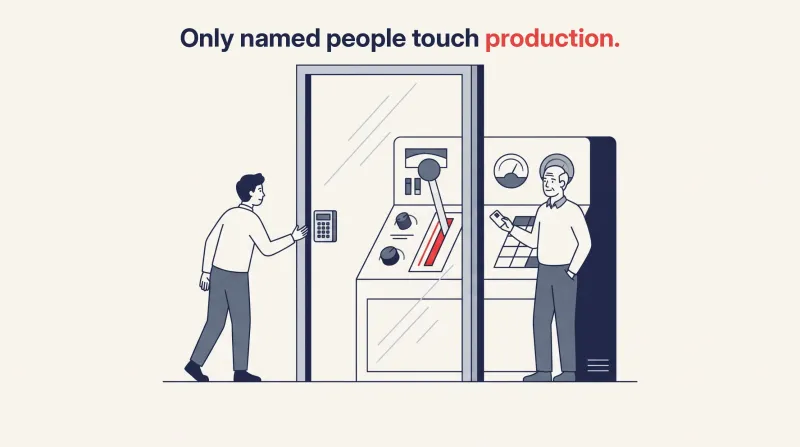
Who touches production. Builders work in development; changes reach production through environments and Git, and only named people can edit there directly.
Identity. SSO, so the person who leaves on Friday loses access on Friday.
Go back to the opening. On an instance configured this way, the junior builder can't save that change in production: they don't have the role. It should never have been possible in the first place.
The detail of each step belongs to its own guide: governance across teams and the security checklist. What matters here is that it takes someone who knows the product well and also understands your business. Get the credentials and the roles wrong, and the license pays for features that protect nothing.
So which plan should you be on?
Count the teams building on n8n, not the workflows. One team, or a small team still finding its feet: the free edition or Pro on n8n Cloud is usually enough. Several teams, or workflows that touch customers and money: price a paid plan against the hours your engineers already spend on workarounds, and budget for configuring it properly.
If you're not sure which side of that line you're on, that's what our evaluation and proof of concept is for: a go or no-go on n8n for your processes, with advice on hosting and on the license you actually need. We build with your team, not around it, and you own everything we build. If you're weighing a paid plan right now, a free intro call is the easiest place to start.
Questions people ask about n8n pricing
Does n8n charge per user? No. Every plan includes unlimited users; the price depends on monthly workflow executions and features (n8n pricing page, checked on November 2, 2026).
What counts as an execution? One full run of a workflow, whether it has three steps or three hundred. A workflow scheduled every five minutes runs roughly 8,600 to 8,900 times a month, by n8n's own estimate on the same page.
Does a sub-workflow count as a separate execution? No. When a workflow calls another one with the Execute Sub-workflow node, only the parent execution counts (n8n docs: Understand executions). That makes sub-workflows an easy way to scale: you can split a large process into reusable pieces without multiplying what you pay for.
Can we move from the Community edition to Business without rebuilding? Yes. n8n sends a license key that you apply to your existing self-hosted instance. Your workflows stay where they are; what changes is the work of setting up projects, roles and environments around them.
What happens if we go over our execution quota on Business or Enterprise? The pricing page says workflows keep running, overage charges may apply, and n8n's sales team gets in touch as you approach the limit.