n8n Git: Source Control and Environments for Teams
How n8n source control and environments work, what to do on the Community Edition, and the deploy rule that keeps your production from drifting.

On this page
On a client's production server, two files had been edited directly on the box, and the next deploy from Git stopped: the server's copy no longer matched the repository. The files were part of the small API service that runs next to the client's n8n, not n8n itself, but the lesson is the same for workflows: if production can be changed by hand, Git stops being the truth.
n8n has built-in source control on its Business and Enterprise plans, which links an instance to a Git repository and moves workflows between environments, one branch per environment. On the Community Edition you can still get most of the benefit with the n8n CLI and a deploy rule nobody breaks.
What does "n8n git" actually mean?
Three different things, and searches mix them up:
Source control and environments: n8n's built-in feature for versioning workflows in Git and moving them between instances. This article.
The Git node: a node that runs Git operations inside a workflow, such as cloning or committing to a repository.
The n8n GitHub repository: n8n's own source code.
If you came for the second or third, the n8n docs and GitHub have what you need. If your team builds workflows and needs to know which version is in production, keep reading.
How do n8n source control and environments work?
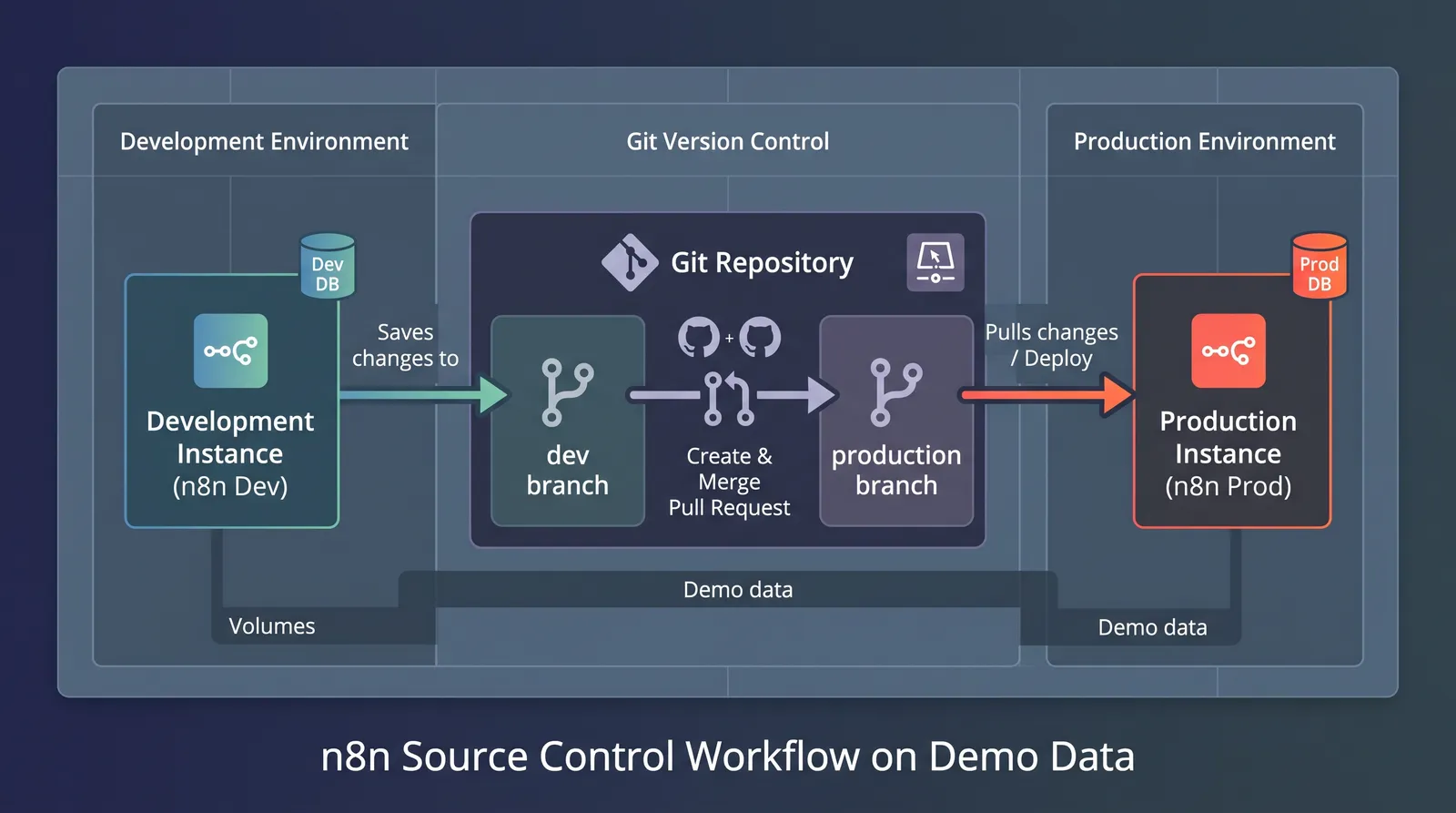
You connect each n8n instance to the same Git repository, each on its own branch: development on one, production on another. Builders push workflow changes from the development instance to its branch; changes reach production through a pull request into the production branch, and the production instance pulls them (n8n docs, source control and environments).
A few things to know before you set it up:
It's a paid feature. n8n's "Compare editions" page lists environments among the features the Business and Enterprise plans add (n8n docs, compare editions). Prices are on n8n's pricing page.
Credentials don't travel with their secrets. What goes to Git is the credential's reference, not the API key or password; each environment holds its own values (same page). That's what you want: production keys never sit in a repository.
Variables differ per environment. A webhook URL or a database name that changes between development and production belongs in a variable, not hard-coded in the workflow (n8n docs, custom variables).
The common mistake is to set it up and keep editing in production anyway. n8n has a setting for it, a protected instance that blocks editing source-controlled resources, which suits production (n8n docs, set up source control). Even so, the rule has to be agreed by the team (last section).
What can you do on the Community Edition?
Export and import workflows with the n8n CLI, and keep the files in Git yourself.
# inside the n8n container: export every workflow as a separate file
n8n export:workflow --all --separate --output=/backups/workflows/

# on the target instance
n8n import:workflow --separate --input=/backups/workflows/We've used the same export to move a client's whole self-hosted instance to n8n Cloud: workflows and credentials exported with the CLI, copied across, imported on the other side. For version control, a scheduled workflow or a cron job runs the export and commits the files, so every change has a date and a diff.
It's not the same as the built-in feature. There's no push button in the editor, no branch per instance, and credentials need care: export them only if you have to, never into a repository in decrypted form. But it answers the first question anyone asks after an incident: what changed, and when?
What goes wrong without environments?
The same things, and n8n's own forum has a name for the cause. A reply in a May 2026 thread on team development: "The ownership model in n8n CE is user scoped, not team scoped, and that's why every problem you listed feels like the same problem" (n8n community forum, "Feedback: Feature requests for better team development in n8n", May 2026). Without environments, it shows up like this:
Someone fixes a workflow in production during an incident, and the fix never reaches the copy in development. Next week the development copy overwrites it.
A test run hits real systems. Without a separate environment, "trying it once" sends a real email or creates a real bill.
Nobody knows which version is live. The builder who knew has moved on, and the workflow history doesn't go back far enough.
You may be thinking this only matters for large teams. It starts mattering at two builders. With two, the state of the instance stops living in one head.
What's the deploy rule that keeps production clean?
Nothing changes in production except through the repository. Not a workflow, not a script, not a config file.
For the client server we opened with, the fix was a stricter deploy: every deploy runs git fetch and git reset --hard origin/main, so the server always matches the repository exactly, and any change made by hand on the box is overwritten on the next deploy. That sounds harsh. It's meant to: a hand edit that disappears teaches the team to commit it next time, while a hand edit that survives teaches them it's fine.
For n8n workflows, the equivalent is simple:
Builders work in the development instance only.
Changes go to production through the repository, reviewed by someone who didn't build them.
Production is protected, and editing there is limited to the people who approve deploys; they don't build there.
An incident fix is the one exception, and it goes back into the repository the same day.
Version control moves the state of your n8n out of the heads of the people who built it, and that's where most team problems on n8n start. That's what governance means in practice, and the full picture, with standards and reviews, is on our Adoption for engineering teams page.
Short questions
Is workflow history the same as version control? No. Workflow history keeps previous versions of a workflow inside the instance; how far back depends on your plan (n8n's pricing page). Git keeps them outside the instance, with who changed what and why.
Can I use GitLab or Bitbucket? n8n's source control works with Git providers over SSH (n8n docs, source control and environments).
Should workflows live in the same repository as our code? If the workflows call your own services, yes: a change to an API and the workflow that calls it can then be reviewed and deployed together. If n8n stands alone, a repository of its own keeps the history easier to read.
Who should review a workflow change? Someone who didn't build it and who knows the systems it touches. The review isn't about style: it checks which credentials the workflow uses, what it writes, and what happens when a step fails.
Can a CI/CD pipeline deploy n8n workflows? Yes. On the Community Edition, the pipeline runs the same n8n import:workflow command against the target instance, or calls n8n's public API (n8n docs, n8n public API). With the built-in feature, the pipeline merges into the production branch and triggers the pull on the production instance (same page).
Do I need three environments? Two (development and production) cover most teams. Add staging when production changes need sign-off from someone outside the build team.
Where to start
Export your workflows today, commit them, and agree on the deploy rule before you buy anything. If several teams build on your n8n, our Adoption for engineering teams service sets up environments, reviews and standards with your team: we build with your team, not around it, and you own everything we build.
Symplytics is an official n8n Expert Partner based in Toronto. If your n8n has more builders than it has rules, a free intro call is where we'd start.