n8n Security Checklist for IT Teams
The checks we run on a self-hosted n8n: version, public endpoints, credentials, encryption key, access, community nodes and backups, with sources.

On this page
- The checklist at a glance
- Is the instance on a supported version?
- What can the internet reach?
- Where do credentials and the encryption key live?
- Who has admin access?
- What can code inside a workflow do?
- Which community nodes are installed?
- Can you restore it, and see what happened?
- Short questions
- Where to start
When we connected a client's n8n to QuickBooks Online, we built the OAuth flow ourselves: two webhook workflows, a state value checked on every callback so a forged request is rejected, and the access tokens stored in the client's own Postgres. That covers one line of the checklist below: where credentials live and who can reach them.
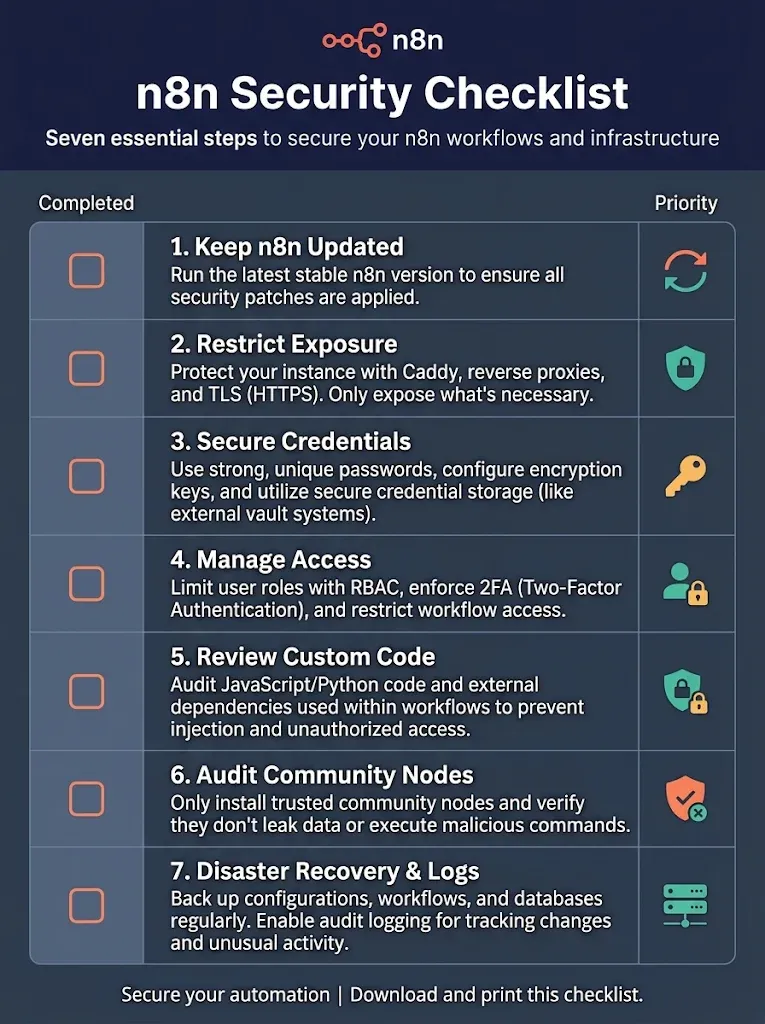
A self-hosted n8n is secure when seven things are true: it runs a supported version, the internet reaches only what it must, credentials and the encryption key are under control, admin access is limited, code inside workflows is contained, community nodes are vetted, and you can restore the instance and see what happened.
Most of these checks have an owner problem underneath: a credential tied to one builder's account, an admin login nobody else knows. This is the list we use to check an instance.
The checklist at a glance
# | Check | Pass when |
|---|---|---|
1 | Version | Within a few weeks of the current release, and every security release applied |
2 | Exposure | Only the webhooks and forms that need to be public are public; each one authenticates |
3 | Credentials | Encryption key set by you and stored outside the server; tokens scoped to what each workflow needs |
4 | Access | Few owners and admins, each with a named account; no shared logins |
5 | Code | Task runners in external mode; |
6 | Community nodes | Each one reviewed, with a reason to keep it |
7 | Recovery and logs | A backup restored at least once; logs kept somewhere you'll look |
When a security team reviews n8n, its questions split in two. In one thread on n8n's forum, a team's vendor risk assessment asked six, from SOC 2 to credential encryption to community node vetting (n8n community forum, August 2025). n8n answers the questions about its own reports; whoever installed the instance answers the rest. The table is the rest.
Is the instance on a supported version?
This is the check that mattered most in 2026. In January the Canadian Centre for Cyber Security published advisory AL26-001 on vulnerabilities in n8n, recommending organizations upgrade affected instances to the latest supported version (Cyber Centre, AL26-001, January 12, 2026). Censys had counted 26,512 exposed hosts running vulnerable versions a few days earlier (Censys advisory, CVE-2026-21858, January 7, 2026).
n8n releases a new minor version most weeks (n8n release notes). You don't need every one. You need a routine that catches the security ones within days: someone reads the release notes weekly, and a tested upgrade path exists (n8n docs, Docker Compose).
What can the internet reach?
Less than you'd think it needs. Censys counted 26,512 exposed hosts on vulnerable versions in January (first section): an instance reachable from the internet is the default unless someone narrows it.
Webhooks and forms. List the ones that must receive outside calls. Everything else stays internal. Where patching had to wait, the Cyber Centre advised restricting or disabling public webhook and form endpoints (same advisory).
Authentication on every public webhook. The Webhook node supports authentication such as header auth and basic auth (n8n docs, Webhook node). A secret header shared with the caller costs nothing.
The editor. If your builders work from known networks, put the editor behind a VPN or an IP allow-list at the reverse proxy.
MCP endpoints. An MCP Server Trigger is a public door that an AI client knocks on. Same rules: authentication, and a narrow tool behind it (n8n docs, MCP Server Trigger).
Where do credentials and the encryption key live?
n8n encrypts credentials in its database with one key. Set N8N_ENCRYPTION_KEY yourself and store it outside the server, in your password manager or secrets store (n8n docs, encryption key). Lose it, and a database backup restores workflows with credentials nobody can decrypt. n8n 3.0, in early access since October 27, 2026, turns encryption key rotation on by default. Your N8N_ENCRYPTION_KEY stays the master key and doesn't change, but n8n then keeps a second key in the database, and older versions can't read data written with it. Back up the database before you upgrade (n8n docs, rotate encryption keys, v3.0 breaking changes).
Then check what each credential can do. A workflow that reads invoices should hold a read-only database user, not the admin password. If a credential leaks, the damage stops at what it allows.
For OAuth connections you build yourself, as we did for QuickBooks, validate the state parameter on every callback and store tokens where you control access and backups. On paid plans, credentials can come from an external secrets store instead of n8n's database (n8n docs, compare editions).
Who has admin access?
Count the owners and admins. Each should be a named person, using their own account, ideally with two-factor authentication (n8n docs, two-factor authentication). A shared admin login means nobody can say who changed what.
When IT requires every tool to sign in through the company directory, that's SSO, a paid feature (n8n docs, compare editions). Setup is on n8n docs, SSO.
What can code inside a workflow do?
A Code node runs JavaScript or Python written by whoever builds the workflow. Since version 2.0, n8n runs Code node executions on task runners by default (n8n docs, v2.0 breaking changes). By default the runner is a child process started by n8n, with the same user on the same host (internal mode). n8n's docs call that "insecure by design" and don't recommend it in production; in production, run the runners in external mode, as a separate container (n8n docs, task runners). Then check that code can't read the server's environment variables, which often include database passwords: N8N_BLOCK_ENV_ACCESS_IN_NODE is true by default since 2.0 (v2.0 page).
In external mode, the runners are a separate container, and the auth token must match on both sides. On one client upgrade, a mismatch there was the first error we saw after the instance came back.
Which community nodes are installed?
Community nodes are code from outside n8n, running inside your instance. List them, and for each one ask who maintains it, when it was last updated, and whether a built-in node now does the same job. On recent versions, for example, the MCP nodes that people once installed from the community are built in.
Remove what nobody can justify. A node you don't use can still be exploited. On n8n 2.x, unverified community packages can be installed from npm by default. n8n 3.0 (early access) turns that off, and setting N8N_UNVERIFIED_PACKAGES_ENABLED=false does the same today (n8n docs, v3.0 breaking changes).
Can you restore it, and see what happened?
Two questions every incident asks first.
Restore: a scheduled database backup, copied off the server, restored at least once on another machine, with the encryption key at hand.
Logs: n8n's logging is included on every edition; log streaming to an external system is on paid plans (n8n docs, compare editions). Either way, logs that nobody looks at don't count. Decide who reviews them and how often.
Short questions
Is n8n Cloud more secure than self-hosted? It moves most of this list to n8n. n8n's Trust Center lists SOC 2 Type 2 and SOC 3 reports (n8n Trust Center). What we set up on self-hosted instances is on our Deployment and security foundation page.
How often should we run this checklist? Once fully, then items 1 and 2 every month, and the whole list after every major version.
Does this cover AI agents? It covers the instance they run on. Agents add their own risks, on credentials and on the process around them (more on our Implementation page).
Where to start
Run item 1 and item 2 today: check your version, and list every public webhook and form. If you'd rather have the whole list done with your team, our Deployment and security foundation service builds it in, before the volume arrives: we build with your team, not around it, and you own everything we build.
Symplytics is an official n8n Expert Partner based in Toronto. If your IT team has a security review coming up, bring this list to a free intro call.