Self-Hosted n8n vs n8n Cloud: Which Fits Your Company
One n8n upgrade took us a full week on a self-hosted instance. Community, paid license or Cloud: how they compare on updates, support and security, and which fits your company.

On this page
- What are the three ways a company can run n8n?
- Is self-hosted n8n more secure than n8n Cloud?
- How often does a self-hosted n8n need updating?
- Who helps when a self-hosted n8n breaks?
- When is n8n Cloud the better choice?
- How does a company install self-hosted n8n?
- What does a company need before self-hosting n8n in production?
- Short questions
- Where to start
Fifty workflows, about twenty credentials, and a full week of work (around 40 hours): that's what it took us to move one self-hosted n8n instance from version 1 to version 2. Most of that week went into planning, preparing and testing, so that no workflow and no credential got lost on the way.
Self-host with the Community Edition if your team can install and maintain n8n and wants to keep costs down. Self-host with a paid license if you keep your own infrastructure but need the paid features, and choose n8n Cloud if you want a subscription with no servers to run, and your data can live in n8n's cloud.
Whichever you pick, self-hosted is only safer when you run it like critical infrastructure.
What are the three ways a company can run n8n?
Most comparisons stop at "self-hosted or Cloud". For a company there are three options, because self-hosted splits in two: the free Community Edition and a paid license on your own servers.
Community Edition, self-hosted | Paid license, self-hosted | n8n Cloud | |
|---|---|---|---|
Who installs and runs it | Your team | Your team | n8n |
Who applies updates | Your team | Your team | n8n |
Support | Community forum and docs | Business: forum. Enterprise: email and dedicated support with an SLA | Starter and Pro: forum. Enterprise: email and dedicated support with an SLA |
Where the data lives | Your servers or private cloud | Your servers or private cloud | n8n's cloud |
Paid features (SSO, environments, more) | No | Yes, by plan | By plan |
How you pay | Your infrastructure and your people | License, infrastructure and people | Subscription |
Sources: n8n's pricing page and n8n docs, compare editions.
Prices change often, so we keep them in one place: n8n's pricing page. What the Community Edition allows without paying is on the same page.
Read the last row again. Two of the three columns say "your people", and that's the cost most hosting comparisons leave out. If the bill is the only reason to self-host, it comes back as engineering time.
The Community Edition still makes sense for a small company with someone who knows Docker, Postgres and Linux, and wants to keep spending low. A paid license on your own servers fits a company that already runs its own infrastructure and needs features the free edition doesn't have. Cloud fits a company that wants n8n to be a subscription, not a system it maintains.
Is self-hosted n8n more secure than n8n Cloud?
Only if someone keeps it patched and keeps its public endpoints closed. Owning the server gives you control over the data; it also makes the patching yours.
In January 2026 the Canadian Centre for Cyber Security published advisory AL26-001 on vulnerabilities in n8n, recommending that organizations upgrade affected instances to the latest supported version, and restrict or disable public webhook and form endpoints where patching can't happen right away (Cyber Centre, AL26-001, January 12, 2026). A week earlier, Censys counted 26,512 exposed hosts running vulnerable versions (Censys advisory, CVE-2026-21858, January 7, 2026). In practice: each of those was an instance someone had installed and, that week, hadn't upgraded.
People who run n8n say the same on n8n's own forum. One member put it plainly: "I wouldn't say self-hosted is automatically better". Another described adding SSO through a reverse proxy on a self-hosted instance as extra infrastructure to maintain (n8n community forum, April 2026).
Cloud has its own paperwork. n8n's Trust Center lists SOC 2 Type 2, SOC 3, a pentest report and GDPR documents (n8n Trust Center, checked October 22, 2026). The scope of those reports isn't stated on the page, so ask for it if your auditors need it.
Self-hosting is the right call when your data can't leave your network. It is a security improvement only when the upgrades and the closed endpoints come with it.
How often does a self-hosted n8n need updating?
Often. n8n releases a new minor version most weeks (n8n release notes, checked November 9, 2026). Skip a couple of weeks and your instance is already behind.
Usually that's fine. Sometimes the release you skipped is the one that fixes a security hole or a crash, and on a self-hosted instance nobody applies it but you.
A routine keeps that manageable: one person reads the release notes each week, security fixes go in within days, and everything else waits for a planned upgrade window. Without a name next to that job, it becomes nobody's job, and the instance quietly falls months behind.
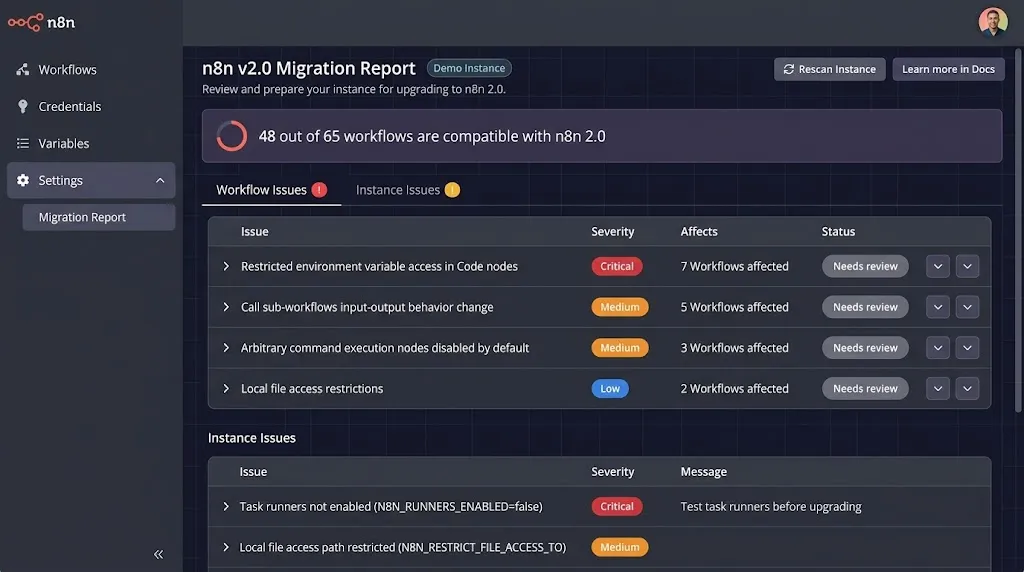
Major versions are a different job. n8n 2.0 changed defaults and dropped options: task runners on by default, authentication required on OAuth callback endpoints, MySQL and MariaDB no longer supported as databases, and the legacy SQLite driver removed (n8n docs, v2.0 breaking changes, checked November 9, 2026). n8n added a Migration Report under Settings that scans workflows and the instance configuration for issues before you upgrade, available to global admins (n8n docs, v2.0 migration tool, checked November 9, 2026).
That report tells you what will break. It doesn't do the checking for you. On the instance we upgraded, with about 50 workflows and 20 credentials, the week went into planning the move, preparing the instance, testing that every workflow and every credential still worked, and only then migrating. It was a small instance, and it still took a week.
Budget a major upgrade on a self-hosted instance like a small project. On Cloud, applying the new version is n8n's job; testing your own workflows against it is still yours.
Who helps when a self-hosted n8n breaks?
With the Community Edition, you do. Help comes from the community forum, the docs and GitHub issues, so you need to understand what you're doing, or have the patience to research it.
You may be thinking the forum is enough. For a test instance it often is. For the instance your order or invoice workflows run on, waiting for a reply on a thread is a risk you've accepted without writing it down.
Support from n8n's own team is an Enterprise feature, on Cloud and self-hosted: email support and a dedicated team with an SLA. Cloud Starter and Pro and the self-hosted Business plan come with forum support, the same place the Community Edition gets help (n8n pricing page, checked November 10, 2026). Even with Enterprise on your own servers, n8n supports the software; the server, the database and the network around it are still your team's.
Cloud support has a boundary too. n8n keeps the platform running; your workflows, the credentials in them and the systems they call are still yours to fix. Support helps when n8n misbehaves, not when a vendor changes its API under your invoice workflow.
That gap, between the software someone supports and the infrastructure nobody does, is where most self-hosted incidents start. (Ours included.)
When is n8n Cloud the better choice?
When nobody on your team should be maintaining servers, and your data is allowed to sit in n8n's cloud.
The second condition decides it for some companies before anything else. A client contract, an internal policy or a regulator can rule out a vendor's cloud, whatever certificates the vendor holds. If that's you, the choice is between the two self-hosted columns.
If it isn't, ask three questions before you sign: where the data is stored, which other companies process it for n8n, and how long execution data is kept. The Trust Center holds n8n's security and privacy documents (n8n Trust Center, checked October 22, 2026). The third answer is partly yours: how much execution data each workflow saves is a setting you control, and workflows that handle personal data should save as little as they need.
The first condition is where we've seen teams change their minds. One client started on the Community Edition, self-hosted, to run a proof of concept. When it worked and they planned production, they moved to n8n Cloud: their team was small, and they wanted support behind the system they were about to depend on.
Most articles describe the opposite move, from Cloud to self-hosted once the bill grows. Both directions are valid. Self-hosting to test and Cloud to run is a sound order for a small team, because the proof of concept costs nothing and nobody has to maintain a server once it matters.
How does a company install self-hosted n8n?
On one server, with Docker Compose, in most cases. n8n's docs cover installing with Docker, with npm, and on cloud providers and Kubernetes (n8n docs, hosting). npm is fine on a developer's laptop. Kubernetes makes sense when you need n8n to keep running when a machine fails. For a company running its first production instance, Docker Compose on one server is the usual starting point: n8n, Postgres and a reverse proxy, each in its own container (n8n docs, Docker Compose).
The order matters more than the commands:
A test server first. Install there, break things, and only then build production the same way.
Postgres from day one. Moving off SQLite later means a migration you didn't need.
Your own encryption key, set before the first credential is created, and stored outside the server.
The reverse proxy and TLS before the instance is reachable from outside.
A pinned version, so upgrades happen when you choose.
Register the Community Edition with your email for the free license key (n8n docs, compare editions).
An install takes an afternoon. What follows decides whether it's still healthy in a year.
What does a company need before self-hosting n8n in production?
A foundation, built once, before the volume.
Postgres as the database, with backups that you've restored at least once (n8n docs, supported databases).
A reverse proxy with TLS, and public webhook and form endpoints limited to what needs them (the measure the Cyber Centre advisory recommends when patching has to wait).
The encryption key stored outside the server. n8n encrypts credentials with it; lose the key and the credentials in your backup can't be read (n8n docs, encryption key).
A copy of the instance to test upgrades on, so the next major version is tested before production sees it.
A routine for updates: who checks the release notes, how often, and who applies them.
Queue mode and workers once volume grows (n8n docs, queue mode).
None of this is hard. It just has to exist before the volume does.
Short questions
Can n8n run on premise? Yes. Self-hosted n8n runs on your own servers or your private cloud, with the Community Edition or a paid license.
Can I run n8n locally to try it? Yes, with Docker or npm on your own machine (n8n docs, hosting). A local instance is for testing; production needs the foundation above.
How much server does self-hosted n8n need? Less than you'd think to start: a small virtual machine runs a single n8n with Postgres for one team. Memory is what runs out first, especially with large files or many executions at once, so watch it in the first weeks and size up from there.
Can we move from the Community Edition to a paid license without reinstalling? Yes. A paid plan comes as a license key that you activate on the instance you already run, so the workflows, credentials and history stay where they are (n8n docs, manage your license). That's one more reason to start self-hosted on a foundation you'd keep.
Can we move between Cloud and self-hosted later? Yes, in both directions (n8n docs, export and import). Plan for credentials: they're tied to the instance's encryption key, so expect to re-enter or migrate them carefully.
Where to start
If you're deciding where n8n should run, start with two questions: can your data leave your network, and who on your team will apply the upgrades every week? Our Deployment and security foundation service builds that foundation with your team, before the volume arrives: we build with your team, not around it, and you own everything we build.
Symplytics is an official n8n Expert Partner based in Toronto. If you're weighing self-hosting for your team, a free intro call is the easiest place to start.