AP Automation That Never Loses an Invoice: Building a Fail-Safe Back Office
Most AP automations don't fail at reading invoices. They fail when an email silently vanishes, and nobody notices it. Here is how your finance team can operate a fail-safe back office.

On this page
Most accounts payable automation projects do not fail because software cannot read a total off a PDF. They fail because an email silently dropped in a shared inbox, an extraction service stalled for twenty minutes, and nobody noticed until an angry vendor called about an overdue bill.
When automation breaks quietly, finance teams stop trusting it. The accounts payable team goes right back to checking the inbox manually, forwarding attachments, and keeping side spreadsheets just to be sure nothing slipped through. Resilient accounts payable automation requires an operational safety net that catches dropped documents, handles vendor system outages, and tells your team exactly what to fix without flooding their inboxes with noise.
Here is how we design accounts payable systems that look after themselves, based on how we recently restructured the invoice flow for a growing North American distributor.
Why do invoices disappear when everything is supposed to be automated?
Traditional automation setups rely on trigger-and-forget workflows. An email arrives in a shared inbox like Payables, a webhook fires, and the system attempts to process the attachment. If an external service is temporarily unavailable or a network connection resets halfway through, the workflow terminates.
The email sits marked as read in Outlook. The accounting system never sees the bill. Unless a clerk cross-references every single email against the ledger at the end of the day, that invoice vanishes from sight until month-end.
According to APQC benchmark data published by CFO.com in 2018 across 1,485 organizations, the median cost to process an invoice is $5.83, while top-quartile performers operate at $2.07 or less. The report noted that the less human touch, the faster the process moves. Yet when automated ingestion fails silently, that human touch does not disappear: it gets shifted into frantic forensic audits when suppliers complain about overdue statements.
In our work with mid-market distributors and manufacturers, the underlying failure points are almost always external:
A document parsing service experiences a temporary hiccup or rate limit.
An attachment is password-protected, illegible, or contains multiple distinct invoices crammed into a single scanned document.
An enterprise login or API token expires unexpectedly.
When teams encounter these issues, their natural instinct is to send an email alert to accounts payable every time a workflow trips. Within two weeks, the team receives hundreds of technical failure alerts mixed with legitimate business exceptions. They create an inbox rule that tucks those alerts into a folder they never open, and the cycle of silent failures resumes.
How do you catch missed emails before the vendor notices?
To eliminate silent drops, you have to stop assuming that initial triggers always fire. Instead of relying on a single moment in time, we implement scheduled reconciliation loops.
Every thirty minutes, an automated reconciliation routine inspects the shared Payables mailbox and compares every received message against the active invoice register in the database. If an email arrived thirty minutes ago and has no corresponding entry in the invoice tracking list, the system catches the discrepancy and sends that specific email through the pipeline again.
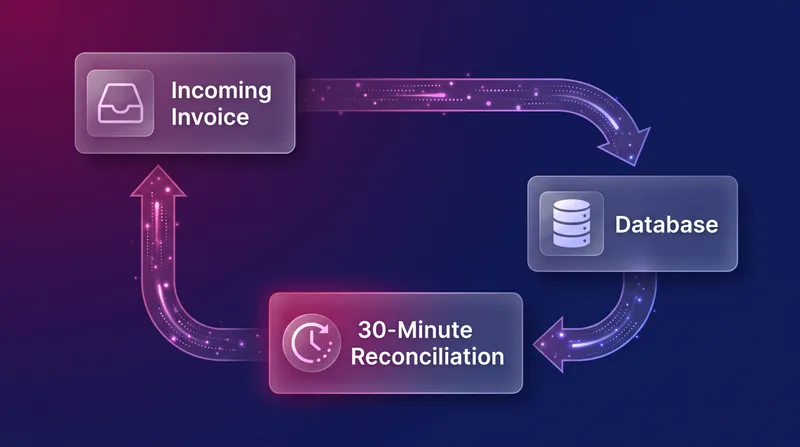
The system retries missed emails automatically up to three times. If an attachment continues to fail after three attempts, it is tagged with a distinct category directly in Outlook: Needs Attention.
This completely changes the daily routine for the accounts payable clerk. They do not have to audit every incoming message. They filter their Outlook view by the Needs Attention category once or twice a day to inspect genuine edge cases, such as a supplier sending a zip file or a photo of a receipt. Once they manually review or forward the invoice, they remove the category. Nothing gets lost in the cracks.
What happens when a vendor service goes down?
Every automated back office relies on a constellation of connected systems: email servers, cloud document storage in SharePoint, document extraction services, task trackers like Monday.com, and communication channels like Microsoft Teams.
When one of these external services goes down, an unprepared automation pipeline panics. Invoices crash halfway through, leaving duplicate records in storage and blank entries in the accounting database.
A dependable back-office architecture decouples service health monitoring from document processing. Rather than discovering an outage when an invoice fails, we run synthetic health checks every fifteen minutes across every connected service, and tag it with either working/degraded/down status:
Monitored Service | Verification Check (15 mins) |
|---|---|
Email Intake | Confirms mailbox connectivity and inbox reading permissions |
Document Storage | Tests read and write access to the accounting SharePoint repository |
Document Reading | Tests endpoint availability and extraction quota thresholds |
Vendor matching | Validates lookup queries against approved vendor tables |
Task Approvals | Checks workspace connectivity in Monday.com and Teams |
Invoice Flow | Tests end-to-end routing integrity across active queues |
When an external reading tool fails at 10:00, the system health dashboard immediately flips that service tile to Down. Incoming invoices do not fail or generate crash reports; they pause cleanly at that exact step.
At 10:45, when the external provider restores their service, our next fifteen-minute check detects that the endpoint is responsive. The system changes the status back to Working and releases all held invoices automatically. They continue through vendor matching and approval routing on their own. The accounts payable team does not touch a button, chase a file, or even need to know that a third-party vendor had an outage.
How can the finance team manage exceptions without alert fatigue?
When an invoice genuinely requires human intervention, the handoff between software and people must be clear, centralized, and quiet.
Research from Boston Consulting Group in 2020 found that 70% of digital transformation initiatives fall short of their targets, with the people and process dimensions being the decisive factor. Automation succeeds only when the operating model fits the people who actually run it.
At our distributor client, we surfaced all automation activity in a dedicated internal portal called Athena. The finance team never looks at backend execution logs. Instead, they look at a single view titled Needs Attention!, where every exception is sorted into plain-language actions:
Status | Meaning | AP Team Action |
|---|---|---|
Retrying automatically | A service was briefly unavailable. The invoice releases once it recovers. | Nothing. The system sorts it out. |
Being checked | Just arrived. The system sorts it into an action within 15 minutes. | Nothing. |
Needs review | Something in the document needs human review (e.g. an unreadable line item). | Review the document, fix the field, and tick Proceed. |
Needs review (retries exhausted) | The invoice failed three times in a day. Automated retries have stopped. | Review the error, tick Proceed, or alert the technical support team. |
Released by AP | The team confirmed the fix and ticked Proceed. | Nothing. The invoice resumes within 15 minutes. |
Notice the clear separation of responsibilities. If an invoice shows Retrying automatically, the team ignores it. If an invoice shows Needs review, a clerk corrects the missing account code or clarifies an ambiguous vendor name directly in the portal and checks a single box marked Proceed.
Within fifteen minutes, the system picks up that record, reads the exact checkpoint stored in the database, and carries on from where it stopped. No retyping the whole bill, and no asking IT to restart a batch.
Crucially, we eliminated notification spam. The accounts payable mailbox receives exactly one notification email: "Invoices need your review". It sends once, the moment the first invoice requires attention. It does not send again while clerks work through the queue.
Infrastructure warnings, expiring authorization tokens, and service outage alerts route directly to our team, not to the finance department. The accounts payable team only hears from the system when an actual invoice needs their judgment.
Building with your team, not around it
When automation is built well, growing your transaction volume does not require adding administrative staff at the same pace. Your team stops being data-entry clerks who spend their mornings retyping PDF lines into accounting software, and becomes reviewers who step in only when human judgment is needed.
Achieving that reliability does not come from finding a single piece of software. It comes from writing down your business rules, accounting for vendor outages before they happen, and building a fail-safe operational net that protects your team's attention. We build with your team, not around it, and you own everything we build.
If you are exploring how to automate accounts payable across your operations without creating an ongoing maintenance headache, a free introductory call is the easiest place to start. We map out your current invoice volume, identify where documents get stuck, and give you a clear roadmap of what to build and what it costs. Our Implementation service builds processes like this with your team, and our use cases show others we've worked on.